Hydrus EPD (Electronic Paper Display) Screen
The EPD (Electronic Paper Display) screen located on the transponder end of the Hydrus, it serves as a user interface, offering control and information to be displayed. The EPD screen enables easy interaction with the system and provides access to important information, It provides connectivity information, offering real-time updates on network connections and enabling users to monitor the system's connectivity status.
Normal Operation Screen Overview
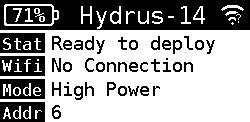
Normal Operation Screen
The Normal Operations Screen of the Hydrus device serves as a comprehensive interface that provides users with essential information about the device's current status and operational conditions. This screen is designed to facilitate effective monitoring and management of the device during regular use.
| Indicator | Description |
|---|---|
| Top Indicator Bar |
The Top Indicator Bar on an Electronic Paper Display (EPD) screen serves as a visual representation of important status information. It displays three key indicators: battery status, the device name, and the Wi-Fi connectivity level.
|
| Status Indicator Bar | The Status Indicator Bar is a visual display element that provides users with important status information about the system or device. The bar indicates operational states and conditions of the system. |
| Wifi Indicator Bar | The Wifi indicator bar provides information about the IP (Internet Protocol) address assigned to the device, it indicates the specific address assigned to the device by the network's DHCP (Dynamic Host Configuration Protocol) server. |
| Mode Indicator Bar |
The Mode Indicator Bar is a visual display which includes text and icons that indicates the different power states Hydrus is currently in. Power states that are displayed are High Power and Low Power. |
Alert Notification Screen Overview
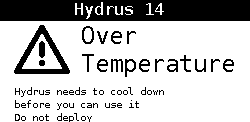
Alert Notification Screen
The Alert Notification Screen on the Hydrus device serves as a crucial interface for communicating important status information and advisories to the user.
| Indicator | Description |
|---|---|
| Top Indicator Bar | This is located at the top of the screen and displays the name of the device, in the example above, "Hydrus 14". This helps users identify the specific device, especially useful when multiple devices are in use. |
| Main Alert Notification | This is the main alert notification displayed prominently in the middle of the screen. It comes with an icon for immediate recognition. The above example warning is triggered when the device's temperature exceeds its safe operating range, indicating a potential risk or issue that needs immediate attention. |
| Advisory | This is an accompanying statement that provides the user with critical instructions on what needs to happen next and what actions should be avoided. In the example above, it informs the user that the Hydrus device needs to cool down before it can be used again and that it should not be deployed in its current state. |